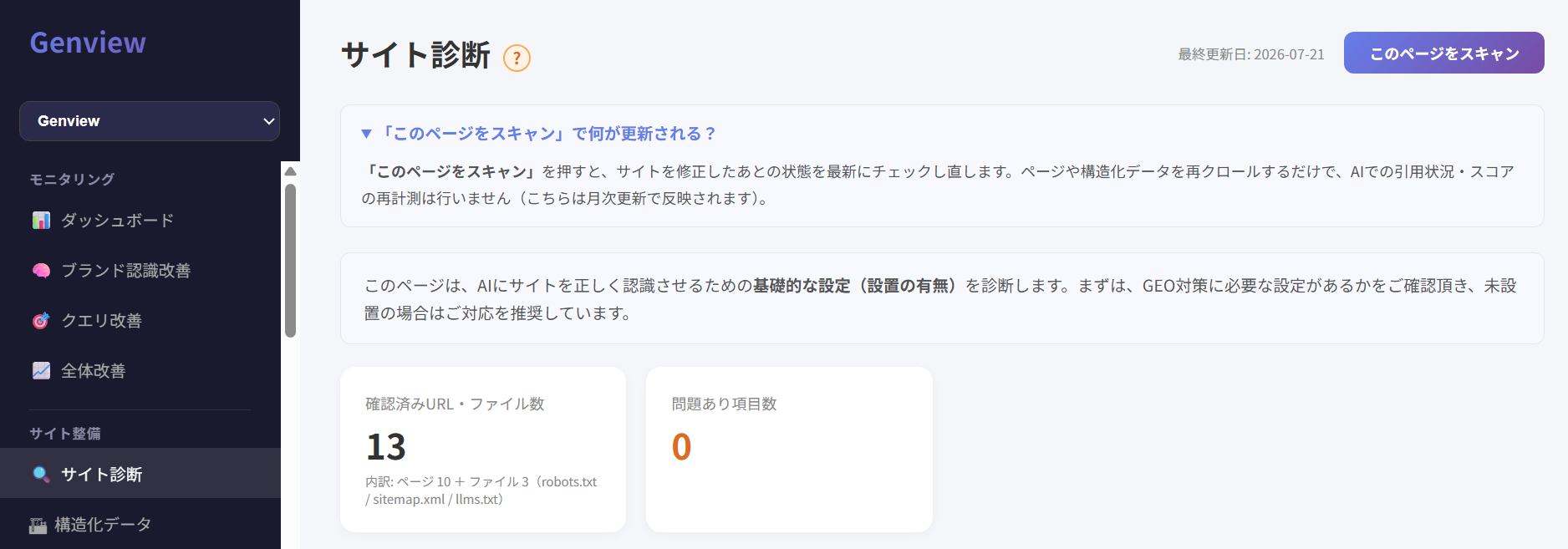
If AI isn't citing your site, the cause is often not your content itself, but the fact that AI can't read your site properly. Genview's Site Diagnosis is built for web managers and marketers who want an easy way to check whether their site is set up for GEO. It mainly checks structured data, llms.txt, AI crawler support, XML sitemap, canonical, and E-E-A-T-related information. Click any diagnostic item to see what each term means.
* This video explains what Site Diagnosis covers and how it automatically checks the two foundations AI needs in order to understand and trust your site (technical and credibility).
An easy way to check whether your site is set up for GEO
To check whether your site is set up for GEO, you first need to confirm that AI can actually read your site, and that the information needed for AI to recognize you as a trustworthy source is in place.
With Genview's Site Diagnosis, simply register your website's URL to see, all in one place, the status of the basic settings GEO requires. You can check whether structured data, llms.txt, AI crawler access permissions, an XML sitemap, canonical, noindex, and E-E-A-T-related information are set up or missing.
The results surface only the items that have a problem, along with the specific location and a concrete fix. That means you don't need specialist GEO knowledge to know what to check first and which items to address.
That said, a basic setting showing as "installed" in Site Diagnosis doesn't guarantee that AI will cite you. Site Diagnosis checks the foundation for being understood and trusted by AI; actual appearances in AI answers are checked in Genview's "Query Improvement."
What Site Diagnosis tells you
There are three steps to being cited by AI. Site Diagnosis covers the foundation — steps ① "being correctly understood by AI" and ② "being trusted by AI."
STEP 01
Understood by AI
Whether crawling, structured data, llms.txt, etc. are in place
→
STEP 02
Trusted by AI
E-E-A-T groundwork such as sameAs, author info, and case studies
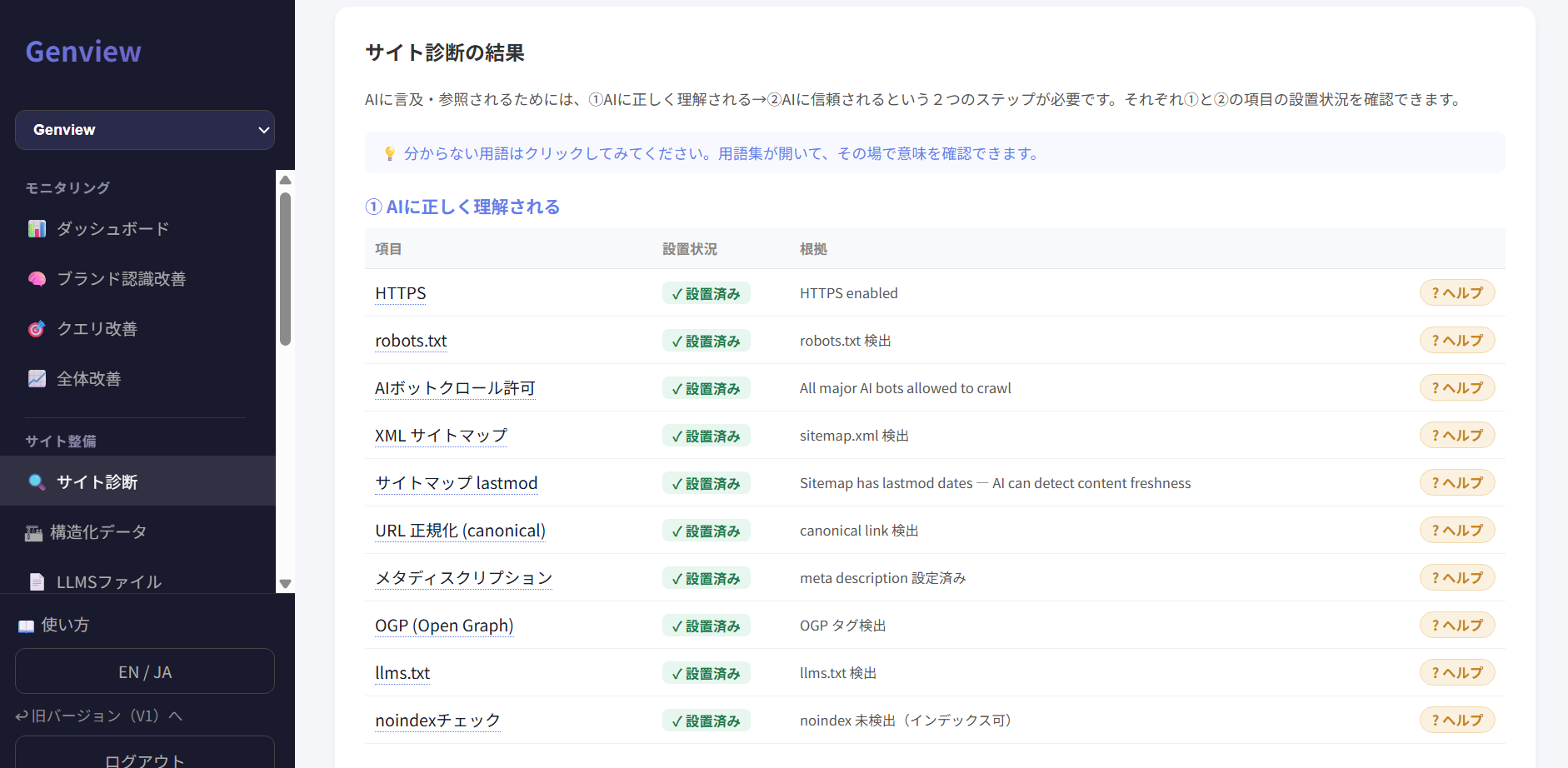
This checks whether AI can properly crawl and parse your site. It diagnoses the status of structured data, llms.txt, sitemaps, and more. Click a term in the diagnostic items to open the glossary and see what each one means.
Item
Status
Evidence
HTTPS: encrypts communication so your site is served securely
✓ Installed
HTTPS enabled
robots.txt: a file that tells crawlers whether they may crawl your site
Not installed
robots.txt not found
AI bot crawl permission: whether crawlers used by major AI services are allowed to fetch content from your site
✓ Installed
All major AI bots allowed to crawl
XML sitemap: a file that tells crawlers the main URLs on your site
✓ Installed
sitemap.xml detected
lastmod: the last-updated date for each URL shown in the sitemap
✓ Installed
Sitemap has lastmod dates — AI can detect content freshness
URL canonicalization (canonical): indicates which URL is the reference version among identical or similar pages
✓ Installed
canonical link detected
Meta description: meta information that summarizes the page
✓ Installed
meta description configured
OGP (Open Graph): meta information that conveys the page's title, description, image, etc. to external services
✓ Installed
OGP tags detected
llms.txt: a text file that organizes your main pages and site structure for AI to reference
Not installed
llms.txt not found
noindex: a setting that tells search engines not to list the page in search results
✓ Installed
noindex not detected (indexable)
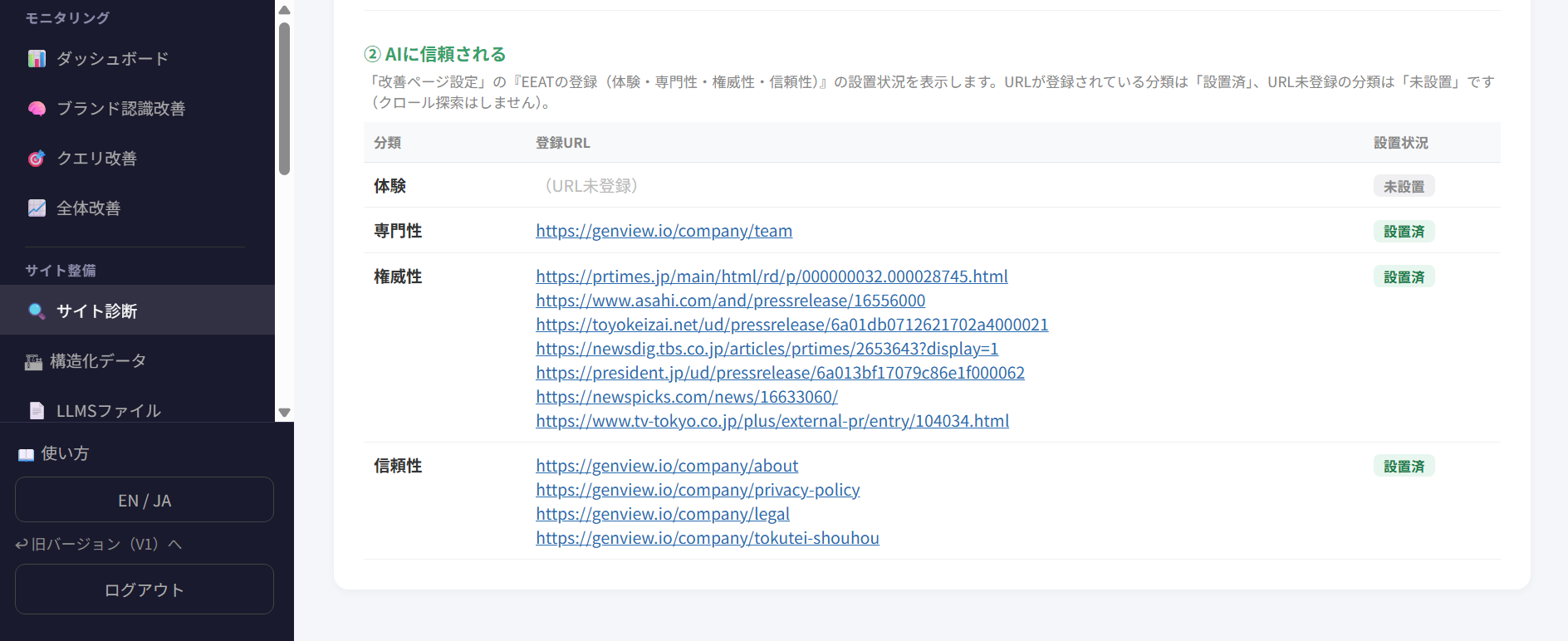
② Being trusted by AI
This checks how well you're set up for AI to recognize your company as a trustworthy source of information, evaluated from an E-E-A-T (Experience, Expertise, Authoritativeness, Trustworthiness) perspective. It shows whether URLs have been registered under "E-E-A-T Registration (Experience / Expertise / Authoritativeness / Trustworthiness)" in "Improvement Page Settings." Each category is marked "Set" if a URL is registered there, and "Not set" if not. This item does not crawl your site to automatically discover matching pages.
Category
Registered URL
Status
Experience
—
Not set
Expertise
—
Not set
Authoritativeness
—
Not set
Trustworthiness
—
Not set
* "Registered URL" shows the URL entered under "E-E-A-T Registration" in "Improvement Page Settings." Any category with nothing registered is shown as "Not set."
Items to improve (failed checks only)
Only items with a "failed" status are shown here, along with a specific fix. Once you've addressed an item, run "Scan this page" again to update its status.
robots.txt: Not installed
Add a robots.txt file at your site's root, and specify your crawl policy for AI search engine crawlers.
llms.txt: Not installed
Create a /llms.txt file at your site's root that organizes the main pages and site structure you want AI to reference. You can use the llms.txt generation tool in the admin panel.
Frequently asked questions
Q1. What can Genview's Site Diagnosis check?
Genview's Site Diagnosis checks the basic settings needed for AI to read your site and recognize it as a trustworthy source of information. Specifically, it diagnoses the status of structured data, llms.txt, AI crawler access permissions, an XML sitemap, canonical, and E-E-A-T-related information.
Q2. What's the difference between Site Diagnosis and Query Improvement?
Site Diagnosis checks the technical and credibility-related basic settings needed for AI to understand and trust you. "Query Improvement," on the other hand, checks whether your site actually appears in real AI answers.
Q3. If Site Diagnosis finds a problem, how can I address it?
Genview extracts only the items that failed and shows you the specific location and fix for each. For example, if robots.txt or llms.txt is missing, you can see where to place it and what to include. After you fix it and re-scan, the status updates to reflect the change.
Q4. How is E-E-A-T-related information judged?
E-E-A-T-related information is judged by whether a URL has been registered under "E-E-A-T Registration" in "Improvement Page Settings." If a URL is registered for a given category — Experience, Expertise, Authoritativeness, or Trustworthiness — it's shown as "Set"; if not, it's shown as "Not set." This is not something that automatically discovers matching pages by crawling your site.
Q5. If Site Diagnosis shows "Installed," does that mean AI will cite my site?
"Installed" in Site Diagnosis means the basic settings needed for AI to understand and trust your site have been confirmed. However, being "installed" alone does not guarantee that AI will cite you in its answers. You can check the actual state of AI answers in Genview's "Query Improvement."
Q6. How do I check whether my site is set up for GEO?
To check whether your site is set up for GEO, you check basic settings such as AI crawler access permissions, structured data, llms.txt, an XML sitemap, canonical, and E-E-A-T-related information. Genview's Site Diagnosis checks all of these together, showing you which items are missing and what action is needed.
Q7. I don't understand technical things like robots.txt or llms.txt at all — is that okay?
Yes. Here, we only check whether each item is set up, so no specialist knowledge is required at all. Even if something isn't set up, there are tools in the admin panel that can generate it for you automatically, along with support pages for the various settings — so anyone can handle it.